

The unit stands behind the start and follows your athlete down the lane
It measures the distance to the athlete's back 1,000 times a second and sends it to the app while they run. Here is how it works, how you set it up, and what comes in the box.
The unit reads the distance, and the app turns it into speed and splits
It reads the distance to the athlete's back 1,000 times a second
An invisible infrared laser points down the lane at hip height and measures how far away the athlete is.
Your phone gets every reading while the athlete runs
The unit sends its readings to a phone or tablet over Bluetooth, or to a laptop over USB-C.
The app turns the distances into the time, speed and splits
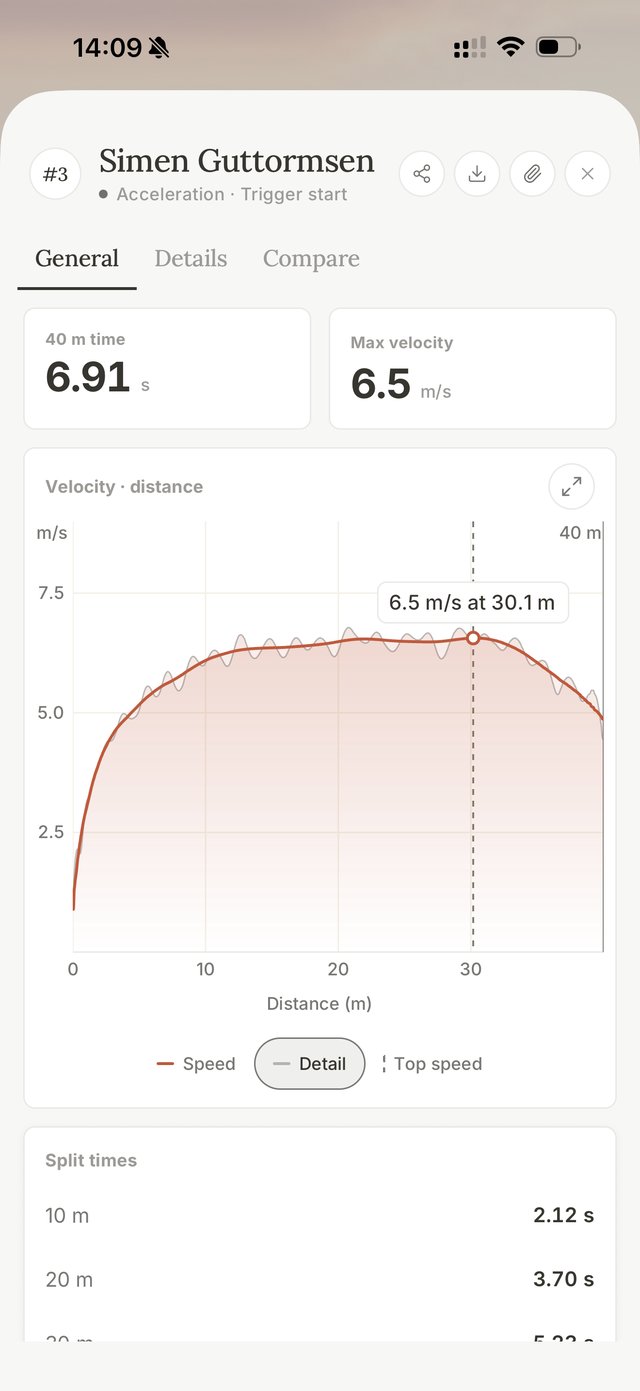
When the run ends you see the time, the top speed, the splits and the full speed curve.
The run is on your phone the moment it ends
This is a 40 m run as the coach sees it: the time, the top speed, the speed curve and the splits.
You can set it up on your own with a tripod
The app has a step-by-step setup guide with these drawings. These are the five steps it walks you through, and the video below shows them at the track.
- 1
Charge the unit and bring a sturdy tripod
The unit charges over USB-C. Bring a photo or video tripod for the geared head from the box, and a few cones to mark the start and the target.
- 2
Put the tripod 1.5 to 2 m behind the start
Line it up with the lane, set the unit at about hip height (0.8 to 1.0 m), level it and point it down the middle of the lane. For long jump and pole vault, stand it about 2 m behind the start of the run-up, as the jumps page shows.
- 3
Aim at the far end of the lane first
Ask the athlete to stand at the target distance with their back to you. Turn the knobs on the geared head until the red dot is on the middle of their back, then check the dot again with the athlete at the start.
- 4
Connect the app to the unit
Switch the unit on and tap Connect laser in the app on your phone or tablet. On a laptop, plug the unit in with the USB-C cable and connect in Chrome or Edge.
- 5
Check the live distance, then record
Have the athlete walk slowly down the lane. The distance should rise smoothly. Then pick a test, and recording starts by itself when they run.
The red dot sight shows you where the invisible beam points
The measuring beam is infrared, so you can't see it. The sight on top of the unit shows where it goes. The dot only appears in the sight's glass, so nothing shines on the athlete.
- Aim far firstFar away the beam is easiest to miss, so line it up at the target distance, then check it at the start.
- Aim at the torsoThe spot is about 26 cm across at 30 m and 90 cm at 100 m.
- Run along the beamAbout half a metre to the side and the beam misses the athlete.
These are the specs we have measured on the unit so far
We only list what we have measured ourselves. Battery life and the weather rating are still being tested on the finished unit.
- Measurement
- 1,000 readings a secondDistance to the athlete's back, sent to the app as they run
- Range
- Past 100 m on a trackA running athlete past 100 m, and sprints at about 10 m/s beyond 90 m
- Timing
- Within 0.01 s of videoFlying 10 m times, checked against video
- Laser
- One Class 1 infrared laser905 nm, invisible, and safe to point down the lane at a running athlete
- Aiming
- Red dot sightAn LED sight, not a laser; the dot only shows in its glass
- Connections
- Bluetooth, USB-C and Wi-FiA phone or tablet over Bluetooth, a laptop over USB-C
- Power
- Built-in rechargeable batteryCharges over USB-C
- Mount
- Standard tripod screwA 1/4-inch thread that fits photo and video tripods
This is what comes in the box
A tripod and a wall charger aren't in the box. Any photo or video tripod with a standard screw works, and the unit charges from a laptop or a USB-C charger.

Get in touch to reserve a unit for your team
Tell us how many athletes you coach and which tests you run. We'll reply with availability and a quote.